
Free WhatsApp Link Generator – Create Click to Chat Links Instantly
In today’s fast-moving digital world, customers expect instant communication. They don’t want to fill out long forms or wait for email replies. They want to click, chat, and get answers immediately. That’s where a Free WhatsApp Link Generator becomes a powerful tool for businesses.
With a simple WhatsApp click-to-chat link, you allow customers to message you directly without saving your number. Whether you’re a small business owner, freelancer, marketer, or enterprise brand, creating a WhatsApp chat link can dramatically increase engagement, leads, and conversions.
Let’s explore how you can create one easily and use it effectively for your business growth.
How to Create a WhatsApp Chat Link in Minutes
Creating a WhatsApp link is surprisingly simple. You don’t need coding skills or technical knowledge. In just a few steps, your WhatsApp link creation process can be completed.
Replace YourNumber with your full phone number including country code (without spaces or special characters).
For example:
If your number is +91 9876543210, your link will look like:
Once done, your WhatsApp chat link created is ready to share anywhere — website, social media, email signature, or ads.
If you’re wondering, “How can I create my WhatsApp link with a pre-filled message?” — that’s also possible. You can add a default message so users don’t have to type anything. This improves response rates and encourages faster conversations.
A properly formatted WhatsApp link to chat makes communication frictionless. The easier it is for customers to connect, the higher your chances of closing deals.
Whether you are using it for support, sales, bookings, or inquiries, a WhatsApp link for chat acts like a direct bridge between you and your audience.
Generate a WhatsApp Number Link for Business Easily
For businesses, turning a phone number into a clickable chat link is essential. Instead of displaying just a number on your website, convert your number to WhatsApp link and make it interactive.
A WhatsApp link for number allows customers to start a conversation instantly instead of copying and pasting your contact details.
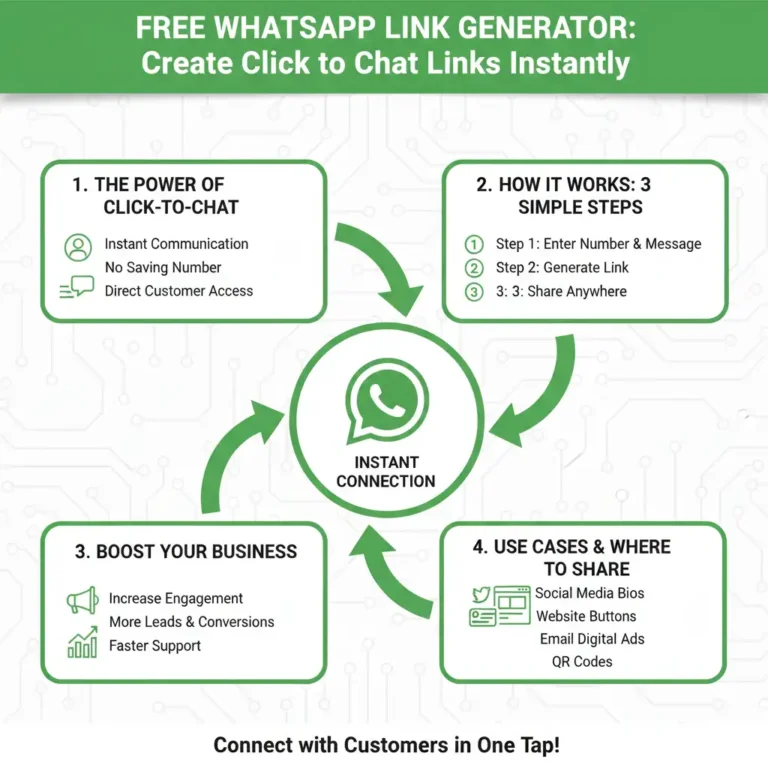
Using a WhatsApp link maker simplifies this process. Many free tools online automatically generate the correct format for you. All you need to do is:
- Enter your phone number with country code
- Add an optional pre-filled message
- Click generate
- Copy your link
That’s it. Within seconds, your WhatsApp number becomes a powerful lead generation tool.
For businesses running ads on Facebook, Instagram, or Google, using a WhatsApp number link improves ad conversions because users prefer direct messaging over long landing forms.
How to Easily Create a Direct WhatsApp Message Link
If you want customers to send a specific inquiry — like “I want pricing details” or “Book my appointment” — you can generate a WhatsApp link to message with a pre-filled text.
A direct WhatsApp link includes a default message so when users click the link, the message is already typed in their chat box. They just press send.
This method works extremely well for:
- Service bookings
- Product inquiries
- Customer support
- Event registrations
- Lead generation campaigns
For example, if you want users to message “I’m interested in your services,” the link can be generated with encoded text so it automatically appears in the chat window.
Using a direct WhatsApp message link reduces hesitation. Customers feel guided, which increases conversation rates significantly.
Best Ways to Add a WhatsApp Click to Chat Link on Your Website
Now that you know how to generate your link, the next step is placing it strategically.
Add a Floating WhatsApp Button
Here are the best ways to use your WhatsApp Click to Chat link:
Place a floating WhatsApp icon at the bottom corner of your website using an Add WhatsApp Button Generator. It stays visible as users scroll, boosting visibility and engagement while helping visitors contact you instantly on WhatsApp.
Add WhatsApp CTA Buttons
Include call-to-action buttons like:
- “Chat with Us on WhatsApp”
- “Get Instant Support”
- “Message Us Now”
Use in Contact Page
Instead of only showing your phone number, add a clickable WhatsApp link.
Add in Landing Pages
If you’re running paid campaigns, a WhatsApp numbers to chat option often converts better than traditional forms.
Include in Email Signatures & Social Bios
Your WhatsApp link can be added to:
- Instagram bio
- Facebook page
- LinkedIn profile
- Email signature
The easier you make communication, the more conversations you’ll generate.
Why Businesses Should Use a WhatsApp Link Generator Tool
Using a free WhatsApp link generator offers several advantages:
✔ Instant customer communication
✔ Higher response rates
✔ Better lead conversion
✔ Easy integration with ads and websites
✔ No app installation required for users
✔ Works on mobile and desktop
In today’s competitive market, speed matters. Customers prefer messaging over calling or emailing. When you provide a click-to-chat option, you remove barriers and create a smooth customer journey.
Final Thoughts
A Free WhatsApp Link Generator is one of the simplest yet most powerful tools for modern businesses. Whether you want to create a WhatsApp link, generate a number to WhatsApp link, or build a direct WhatsApp link with a pre-filled message, the process is quick and effective.
If your goal is to increase engagement, improve customer support, and boost conversions, adding a WhatsApp click-to-chat link should be your next step.
Start today with a WhatsApp API Solution Provider in India, create your WhatsApp link, and make it easier than ever for customers to reach you instantly on WhatsApp.







